Providers
Providers represent the cloud credentials and infrastructure integrations connecting Aegis to upstream Large Language Model (LLM) platforms.
Aegis acts as a security buffer between your client applications and LLM vendors. By managing raw service credentials centrally in the Gateway, developer applications call Aegis via Virtual Keys while Aegis securely authenticates with Google Cloud, AWS, Azure, or OpenAI.
Supported Provider Types
Aegis natively supports multi-cloud provider integration:
| Provider | Supported Services | Authentication Method |
|---|---|---|
| Google Cloud | Vertex AI Models, Gemini 1.5 Pro / Flash, Vertex AI Search, GCS | Service Account JSON / Application Default Credentials |
| AWS | Bedrock Models (Claude 3, Llama 3, Titan), S3 | IAM Key Pair / Role ARN |
| Azure | Azure OpenAI Service | Azure API Key & Resource Endpoint |
| OpenAI Direct | GPT-4o, GPT-4, Embeddings | OpenAI API Key |
Managing Providers
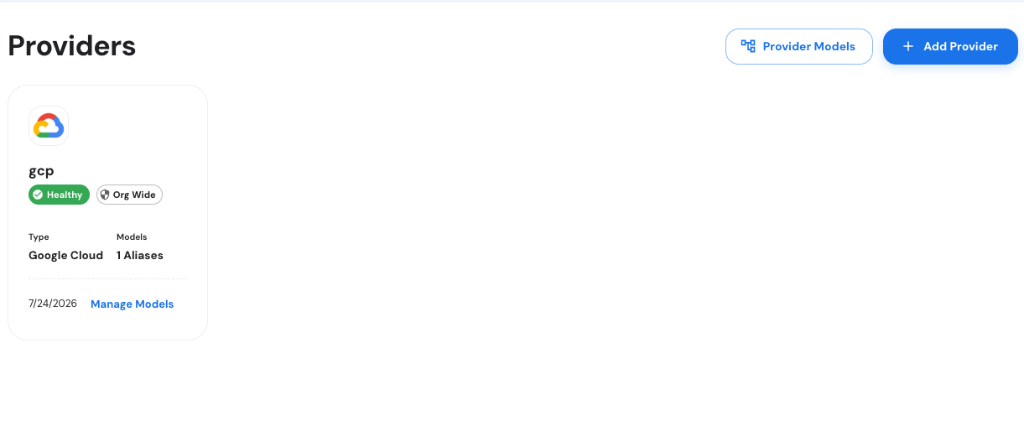
Navigate to Gateway > Providers in the Aegis Console to inspect active provider cards, health indicators, linked model counts, and scope badges (Org Wide / Team Scoped).
Adding a New Provider
- Navigate to Gateway > Providers in the Aegis Console.
- Click + Add Provider in the top right.
- In the modal dialog, complete the two-step configuration:
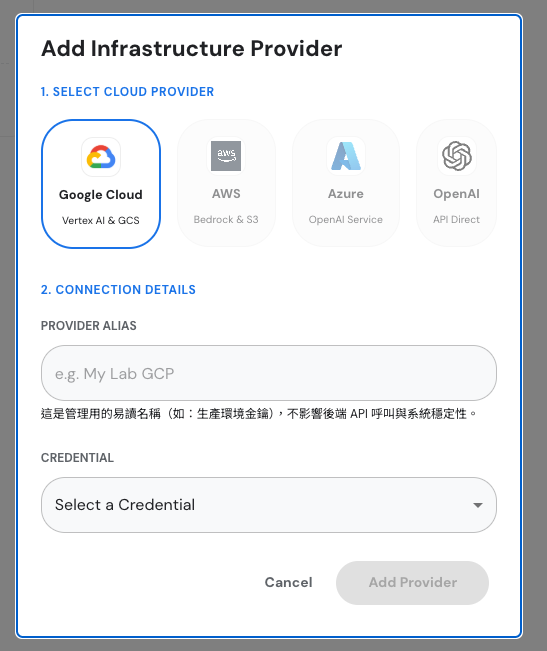
- 1. Select Cloud Provider: Select
Google Cloud,AWS,Azure, orOpenAI. - 2. Connection Details:
- Provider Alias: Enter a friendly management name (e.g.,
gcp,My Lab GCP). This alias does not affect backend API calls or system stability. - Credential: Select a pre-configured credential from your vault dropdown list.
- Provider Alias: Enter a friendly management name (e.g.,
- Click Add Provider.
Provider Status & Security Controls
- Health Monitoring: Aegis automatically probes provider endpoints. Healthy connections display a green
[✓ Healthy]status chip. - Scope Assignment: Providers can be provisioned as
[Org Wide]or restricted to specific Team scopes. - Credential Storage: Raw secrets and private keys are encrypted at rest using envelope encryption.
Provider Actions
- Manage Models: Click Manage Models on any provider card to view or attach model aliases.
- Edit Credentials: Update expired Service Account JSONs or rotate API keys without service interruption.
- Disable / Delete: Suspend or delete a provider after unbinding active model aliases.