Virtual Keys
Virtual Keys are governed API keys issued to client applications, developers, and agent runtimes to access LLMs through the Aegis AI Gateway.
Unlike raw cloud provider keys (such as GCP Service Account keys or OpenAI API keys), Virtual Keys are proxy credentials managed within Aegis. They enforce organizational security, rate limiting, retry policies, and audit logging without exposing raw provider secrets to downstream application code.
Virtual Keys belong strictly to individual Teams. They do NOT exist at the Organization level. When creating or managing Virtual Keys in the Aegis Console, ensure you have selected your target Team in the top bar selector.
Key Benefits
- Credential Masking: Application developers and client services never handle raw upstream provider keys or service account credentials.
- Rate Limit Enforcement: Enforce per-key request caps (Requests Per Minute - RPM) to protect upstream quotas and prevent accidental overspending.
- Team-Level Scope: Virtual Keys are isolated per Team, preventing unauthorized access across team boundaries.
- Automated Upstream Retries: Configure automatic gateway-level retries for transient upstream errors (
429 Too Many Requests,500/502/503/504 Transient Errors) with backoff policies. - Auditability: Every call made using a Virtual Key is logged with full span tracing, latency breakdown, and token consumption metrics.
Managing Virtual Keys
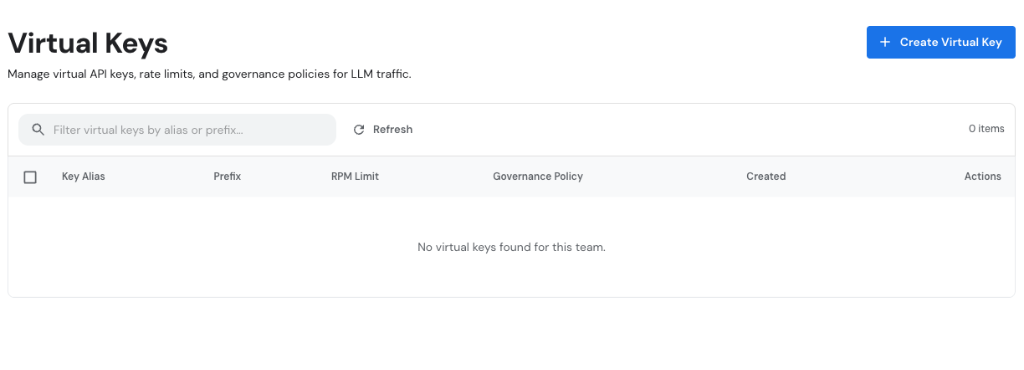
Navigate to Gateway > Virtual Keys in the Aegis Console sidebar to view all active Virtual Keys associated with your currently selected Team.
Creating a Virtual Key
- Select your target Team in the top bar scope selector.
- Click + Create Virtual Key in the top right toolbar.
- In the modal dialog, configure the following fields:
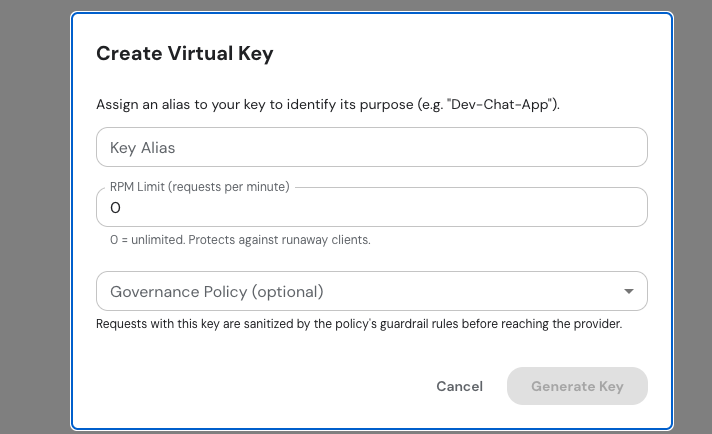
- Key Alias: A descriptive name identifying the key's purpose (e.g.,
Dev-Chat-App,finance-bot-prod). - RPM Limit (requests per minute): Set maximum request rate. Enter
0for unlimited requests. Protects against runaway clients and accidental quota depletion. - Governance Policy (optional): Select a guardrail policy. Incoming requests with this key will be sanitized by the policy rules before reaching upstream providers.
- Click Generate Key.
- Copy Secret Key: Copy the secret key string immediately.
Save your Virtual Key secret immediately in a secure vault. The full key string is shown only once upon creation and cannot be retrieved later.
Key Status & Attributes
In the Virtual Keys table, you can inspect:
| Attribute | Description |
|---|---|
| Key Alias | Display name assigned to the key (e.g., Dev-Chat-App). |
| Prefix | Truncated key prefix identifier (e.g., vgk_live_...). |
| RPM Limit | Active Requests Per Minute throttling cap (0 = Unlimited). |
| Governance Policy | Linked guardrail policy for request sanitization. |
| Created | Timestamp when the key was provisioned. |
| Actions | Edit configuration, regenerate key, or revoke key. |
Editing & Revoking Keys
- Edit Configuration: Click Edit on any row to adjust the RPM limit or change the linked Governance Policy.
- Revoke / Delete Key: Select keys and click Delete. Once revoked, any incoming HTTP requests presenting the key will be immediately rejected with
HTTP 401 Unauthorized.
Using Virtual Keys in Client Applications
Pass your Virtual Key in the HTTP header when invoking Gateway endpoints or initializing the taimoe-python SDK.
Header Authentication
curl -X POST "https://gateway.taimoe.com/v1/chat/completions" \
  -H "Authorization: Bearer vgk_live_8f3a9b2c..." \
  -H "Content-Type: application/json" \
  -d '{
    "model": "gemini-1.5-pro",
    "messages": [{"role": "user", "content": "Hello Aegis"}]
  }'
Python SDK Initialization
from taimoe.platform import init

# Initialize the SDK with your Virtual Key
registry = init(
    api_key="vgk_live_8f3a9b2c...",
    runtime_name="hr-assistant-runtime"
)